DuploCloud’s AI DevOps Engineers run entirely within your cloud, with no third-party data exfiltration. Agents run inside your cloud account and only call services you already authorize. Automate routine infrastructure tasks while maintaining full human oversight. Currently deployed across 34 organizations in GRC, healthtech, SaaS, and government sectors.
The Problem
Infrastructure complexity scales exponentially. Team size doesn’t. Your engineers burn cycles restarting pods, remediating drift, and maintaining runbooks while strategic work stalls. You need automation that reduces toil without introducing new security or compliance risks.
DuploCloud’s AI DevOps Engineers absorb these routine operations inside your cloud, letting your team redirect their time toward architecture, reliability, and delivery.
What’s the Evaluation Criteria
- Risk posture: Does this expand your attack surface or reduce it?
- Guardrails: Can autonomous actions be contained within existing security policies?
- Auditability: Will this produce the evidence your compliance team needs?
- Time-to-value: How long until your team sees measurable relief?
What Are DuploCloud’s AI DevOps Engineers
Six specialized AI agents that function as autonomous DevOps engineers, each handling a distinct operational domain.
The Six AI DevOps Engineers Explained
Each agent performs a specialized DevOps role:
1. Architecture Agent: Documentation Engineer
- Tools: Neo4j queries, AWS API calls, kubectl
- Purpose: Maintains real-time infrastructure documentation and dependency maps.
- How it works: Continuously crawls cloud resources and configuration, builds a live graph in Neo4j, and regenerates diagrams whenever something changes so docs never drift from reality.
- Example request: “Show all services dependent on RDS instance prod-db.”
- Output: Up-to-date Mermaid diagrams and markdown docs generated directly from the live infrastructure state, not stale wiki pages.
2. Kubernetes Agent: Platform Engineer
- Tools: Full kubectl access (within user permissions and with a human in the loop)
- Purpose: Handles day-to-day cluster operations and first-line troubleshooting.
- How it works: Watches cluster events, correlates logs and metrics, then suggests runbook steps; with one click, it can run the kubectl commands on your behalf.
- Example request: “Investigate crashlooping pods in prod.”
- Actions: Identifies failing pods, surfaces the likely root cause, proposes a remediation plan (restart, roll back, or scale out), and executes once you approve.
Watch the K8 Agent in action:
3. CI/CD Agent: The Release Engineer
- Tools: Jenkins API, GitHub Actions API
- Purpose: Pipeline failure resolution and pipeline optimization
- How it works: Subscribes to pipeline events, classifies failures, compares them to a library of past incidents, and proposes a fix or rollback when the remediation is deterministic.
- Integration: Webhooks auto-create tickets on pipeline failure
- Example Task: “Fix failing build #1234 in payment-service”
- Actions: Pinpoints the failing step, surfaces root cause, drafts or applies a patch/rollback, then re-runs the pipeline once you approve.
See the CI/CD Agent troubleshoot a build:
4. Observability Agent: The SRE
- Tools: Grafana API, OpenTelemetry queries
- Purpose: Monitoring and incident response
- How it works: Continuously queries logs, metrics, and traces, correlates spikes across services, and maps them back to recent deployments or infra changes.
- Example Task: “Analyze 500 errors spike from last hour”
- Actions: Clusters similar errors, identifies the probable culprit (service, commit, or dependency), and proposes concrete remediation steps or runbook actions.
5. Cost Optimization Agent: The FinOps Engineer
- Tools: AWS Cost Explorer, resource tagging APIs
- Purpose: Cloud spend analysis and optimization
- How it works: Pulls detailed cost and usage data, groups it by tags / accounts / services, then runs rules to detect idle, over-provisioned, or poorly reserved resources.
- Example Task: “Identify unused EBS volumes over 30 days old”
- Actions: Produces a prioritized savings report with estimated monthly impact and can generate change sets or tickets to right-size or decommission resources.
6. PrivateGPT Agent: Compliance Analyst
- Tools: AWS Bedrock (Claude models)
- Purpose: Secure document/code analysis
- How it works: Run LLM analysis inside your own environment, restricting data to approved repositories and applying policy checks before any output leaves the sandbox.
- Example Task: “Review my expense data for Denver”
- Actions: Flags policy or PII issues, summarizes key findings, and produces redlined recommendations you can feed into your compliance workflows.
How DuploCloud’s AI DevOps Engineers Works
Deployment: Runs on a Kubernetes instance inside your VPC. All data processing happens within your infrastructure. Integrates with AWS Bedrock to run LLMs in your SOC 2 or PCI-eligible environment. Supports air-gapped and private cloud deployments.
Architecture: Agents inherit user permissions through DuploCloud’s AI cloud-based model. They operate within your existing RBAC framework. No standalone service accounts that create privilege escalation risks. Just-In-Time (JIT) access grants temporary privileges only when needed, then automatically revokes them.
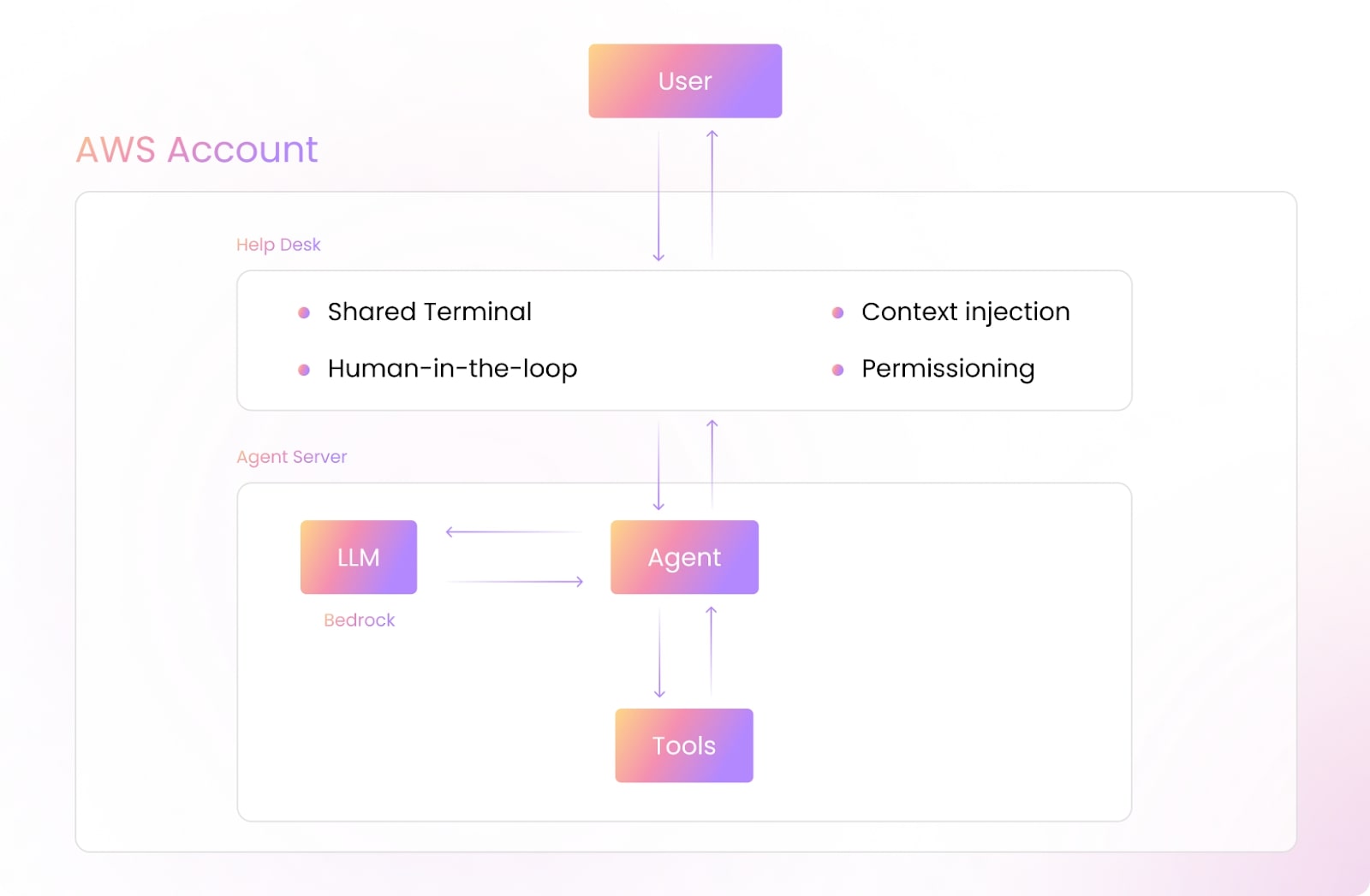
Workflow: Users create tickets via Slack, web interface, or an IDE. Agents analyze using Claude models running in your Bedrock environment, propose actions, wait for human approval, execute approved changes, then monitor and report results.
Let’s see what you can do with these 6 AI agents within your DevOps architecture.
What You Can Do With 6 DuploCloud AI DevOps Engineers
1. Kubernetes Agent: Platform Operations
- Handles: Cluster operations and first-line troubleshooting
- Request: “Investigate crashlooping pods in production”
- Agent actions: Identifies failing pods → surfaces root cause → proposes remediation (restart, rollback, or scale) → waits for approval → executes → verifies stability
- Outcome: Issues that previously consumed 45 minutes of senior engineer time now resolve in 5 minutes with one-click approval.
2. CI/CD Agent: Release Engineering
- Handles: Pipeline failure resolution and optimization
- Request: “Fix failing build #1234 in payment-service”
- Agent actions: Pinpoints failing step → compares to historical failures → drafts patch or rollback → waits for approval → applies fix → re-runs pipeline
- Outcome: Pipeline failures that blocked deployments for hours now resolve during the same sprint, reducing release cycle friction.
3. Observability Agent: Incident Response
- Handles: Monitoring and error correlation
- Request: “Analyze 500 error spike from last hour”
- Agent actions: Clusters similar errors → correlates with recent deploys → identifies probable culprit (service, commit, dependency) → proposes remediation
- Outcome: Incidents that required cross-team war rooms now surface root cause and recommended fixes before the first page goes out.
4. Architecture Agent: Documentation Engineering
- Request: “Show all services dependent on RDS instance prod-db”
- Agent actions: Queries Neo4j graph of live infrastructure → generates current dependency map → outputs Mermaid diagrams and markdown
- Outcome: Infrastructure documentation that stays synchronized with reality, eliminating drift between diagrams and deployed state.
5. Cost Optimization Agent: FinOps Analysis
- Request: “Identify unused EBS volumes over 30 days old”
- Agent actions: Pulls AWS Cost Explorer data → applies usage rules → generates prioritized savings report with monthly impact estimates
- Outcome: Proactive cost reduction without dedicated FinOps headcount.
6. PrivateGPT Agent: Secure Analysis
- Request: “Review expense data for compliance issues”
- Agent actions: Runs LLM analysis in your Bedrock environment → flags policy violations and PII exposure → produces redlined recommendations
- Outcome: Document analysis that never exposes sensitive data outside your environment.
Security and Compliance
Compliance Standards Supported:
- SOC 2 Type II
- HIPAA
- PCI-DSS
- NIST 800-53
- FedRAMP
Security Controls:
Here’s a sample of how yaml runs:
Access Control:
– RBAC inheritance from DuploCloud tenants
– No standalone service accounts
– JIT access for privileged operations
Audit:
– Every agent action logged with:
– User who created ticket
– Agent decisions
– Tools executed
– Human approvals
– Logs shipped to your SIEM (Splunk/DataDog/CloudWatch)
Data Protection:
– Encryption at rest (AES-256)
– TLS 1.3 for all communications
– No data leaves your cloud account
With our technology, security is consistently foundational.
DuploCloud’s AI agents operate under strict governance. We make sure that autonomy never compromises control. Access is tightly managed through Role-Based Access Control (RBAC) inherited directly from your primary DuploCloud user account.
This eliminates the need for standalone service accounts that could introduce risk. For high-impact operations, JIT access is enforced.
Privileges are granted only when required, for the exact duration needed, and automatically revoked upon completion.
Every action taken by an AI DevOps Engineer is fully auditable. From the moment a user creates a ticket, the system logs the full decision chain:
- Agent reasoning
- Tools invoked
- Any human approvals required
These immutable records are automatically forwarded to your existing SIEM environment, whether Splunk, DataDog, CloudWatch, or DuploCloud’s Observability Suite. This allows for seamless integration into your compliance and monitoring workflows.
Data sovereignty and protection are non-negotiable.
All data at rest is secured with AES-256 encryption, while TLS 1.3 safeguards every communication in flight.
Most importantly, no data ever leaves your cloud account. Your infrastructure remains the single source of truth. So you’ll have full visibility and control over autonomous operations.
Deployment Architecture
DuploCloud’s AI Agents are autonomous DevOps engineers that run entirely within your cloud account. We currently have these Agents deployed across 34 organizations in GRC, healthtech, SaaS, and government sectors.
They handle infrastructure tasks through a ticketing interface. And they always have human oversight.
Deployment Architecture
Here’s a sampling of what our deployment architecture looks like in the real world:
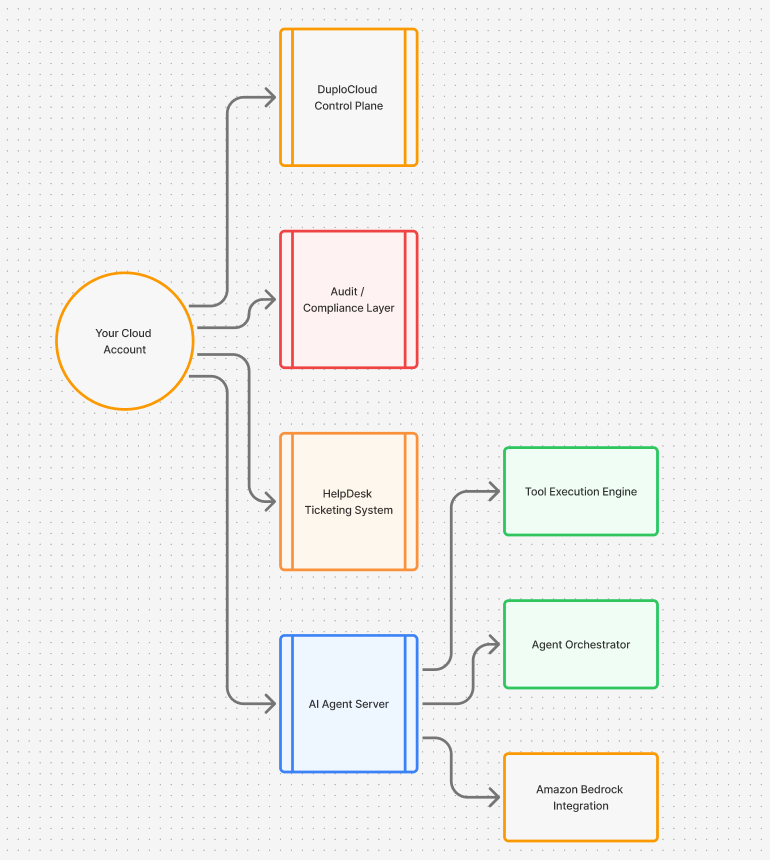
Deployment architecture:
- Runs on K8s instance in your VPC
- Has no external API calls
- Ensures that all data processing happens in your infrastructure
- Supports air-gapped/private cloud deployments
- Integrates with AWS and runs LLMs in your SOC2- or PCI-eligible Bedrock environment. This automates infrastructure, security, and compliance while keeping your data private. It’s never used for model training.
How the Deployment Architecture Works
With DuploCloud, you’re getting prebuilt, production-ready AI Agents that handle some of the most common and time-consuming DevOps and infrastructure management tasks.
These AI Agents integrate seamlessly with your existing DuploCloud infrastructure. We can deploy them immediately to automate routine operations and troubleshooting workflows.
Our Agents will work within DuploCloud’s secure architecture. They inherit user permissions and maintain compliance with your organization’s security policies.
Interfaces and Workflow
There’s 3 ways you can interact with your AI agents once they’re deployed:
- Web Interface: Full HelpDesk with ticket history, approvals, and audit trail
- Slack: /duplo create-ticket “Check cluster health.”
- VS Code: Right-click on k8s manifest, and then “Ask Kubernetes Agent.”
Here is a sample code block:
# Example ticket flow
- User creates ticket: “Production API returning 502 errors.”
- Ticket assigned to Observability Agent
- Agent analyzes (using Bedrock Claude/Llama):
– Pulls Grafana metrics
– Checks pod status via kubectl
– Reviews recent deployments
- Agent proposes action: “Scale API pods from 3 to 5.”
- Human reviews and approves
- Agent executes: kubectl scale deployment api –replicas=5
- Agent monitors and reports results
Want to see this in real-time action? Click the “Try Now” on the menu.
Pricing & Usage Model
Pricing for AI agents start from $3500/month.
Usage-Based on Tickets: Starts at 200 AI tickets/month as part of the Core plan.
What Counts as a Ticket:
- Any user-initiated request
- Auto-created tickets from CI/CD failures
- Scheduled maintenance tasks
What’s Free:
- Agent installation and configuration
- Audit log storage (you pay for your S3/blob storage)
- Integration setup
Take a closer look at our pricing and what you can get at the different pricing levels.
DuploCloud AI Agents Compared to Alternatives
| Feature | DuploCloud Agents | GitHub Copilot for CLI | K8sGPT |
| Deployment | Self-hosted | Cloud-only | Self-hosted |
| Multi-tool | Yes (6 agents) | No | K8s only |
| Compliance | SOC2/HIPAA/PCI | Limited | None |
| Human Approval | Built-in | No | No |
| Ticket System | Yes | No | No |
| Cost | Per ticket | Per user | Open source |
Use DuploCloud Sandbox to test our AI DevOps Agents
There are numerous advantages to using the DuploCloud Sandbox to test AI engineering agents, including but not limited to:
- Validate security posture before connecting your cloud
- Prove compliance and safety controls work for your team
- Experience the exact automation your team would deploy
- Build confidence through complete visibility into every action
- Ship applications faster without manual infrastructure work
- Maintain security standards without slowing down provisioning
- Resolve common operations tasks without manual intervention
Start your 14-day free trial here.
Why the Sandbox is the simplest way to evaluate DuploCloud
There is no setup, no credentials, and no risk to your production systems.
Our guided tutorial walks you through:
- Deploying your first AI agent
- running a task with guardrails
- reviewing execution results
- fixing a failed deployment
- spotting drift in real time
- checking Kubernetes cluster health
You can understand the platform and the AI engineers within minutes.
👉 Start your 14-day free trial: Try Now.
DuploCloud AI Agents FAQ
Can agents access production without approval?
No. You can configure approval requirements based on the environment and action type.
What happens if Bedrock is down?
If Bedrock is down, our Agents will fail safely. Your manual operation will continue normally.
How do you prevent hallucinations?
Our Agents can only execute pre-defined tools with parameter validation. They cannot run arbitrary commands.
Integration with existing tools?
We do have APIs available. Our current integrations are: ServiceNow, PagerDuty, and Jira (via webhooks).
How can I see what autonomous DevOps feels like?
Start by running the agents locally. Then, watch how they interact with your existing stack. Finally, decide for yourself where they fit.
Is there a sandbox where I can test AI agents?
Yes. We provide a fully isolated sandbox where you can deploy the agents and see them in action without touching production.