You get your headcount approved, and then you spend three months recruiting. Once you find someone you like, you make the offer, and, if all goes well, your DevOps engineer accepts.
But now… you wait.
The onboarding usually takes several weeks. Why? Because getting your new hire the knowledge they need to do well at your company takes months.
And just when your newest team member hits peak productivity, one of your competitors poaches them for 20% more. They take all that knowledge, all that training, and all that investment with them.
Meanwhile, your Kubernetes issues pile up.
Your pipelines keep breaking, and your team is flailing around, drowning without the support they need.
We’re here to tell you there’s a better way.
What Every DevOps Hire Actually Costs You
To get started, we’re going to walk through a classic example of what happens when you bring on a new DevOps engineer.
Let’s call our new hire Peter.
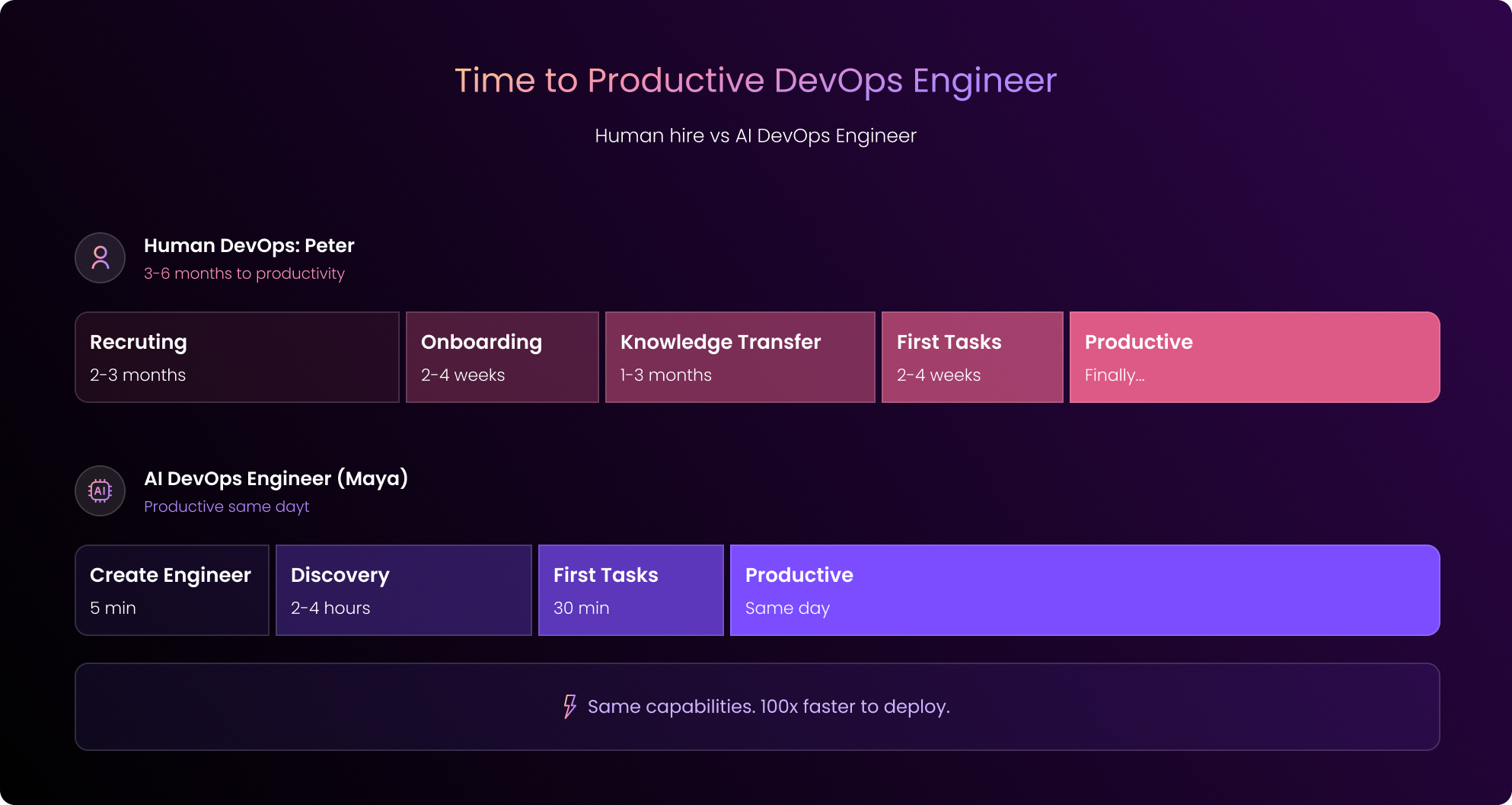
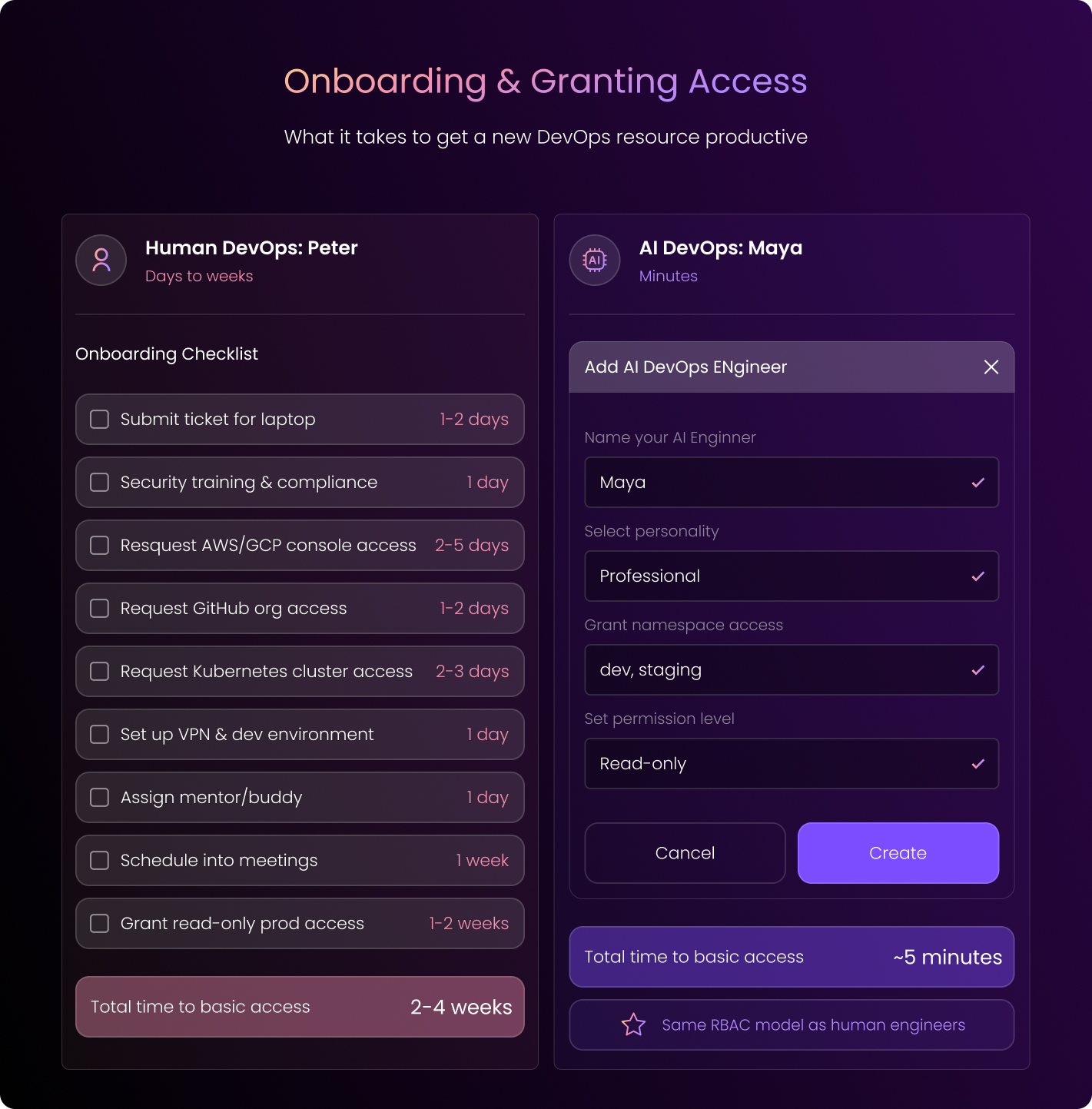
Stage 1: Onboarding Begins (Days to Weeks)
Before anything else, Peter needs IT access, a mentor, and access to your infrastructure and IaC repos. You get him started with read-only, obviously.
Nobody’s giving a new hire production access on day one.
This whole process takes several days, at the very least. In many cases, it actually takes weeks to get Peter fully onboard, considering:
- Security reviews
- Access request queues
- All those excess discoveries that pile up: “Oh, you also need access to X.”
Stage 2: Knowledge Transfer (Weeks to Months)
Okay, Peter has all his access. Now, he’s going to spend the next few months getting up to speed. He mines through sparse documentation, and he interrupts his colleagues (who don’t have time to help).
He reads code, he stares at dashboards, and he runs Terraform plans. During this time, he’s also learning the unwritten rules.
Of course, Peter’s challenges stack up.
He’s finding that tribal knowledge lives in people’s heads, your documentation is outdated, and IaC doesn’t cover everything deployed.
Peter can’t find time with the right people to get everything cleared up because they’re busy with their own tasks.
The worst part of all: you won’t even be able to tell if Peter is actually any good until months in.
Stage 3: First Tasks Happening in Real Time
Great, now Peter is fully onboard. So he gets his first ticket. It’s a crashing pod in staging.
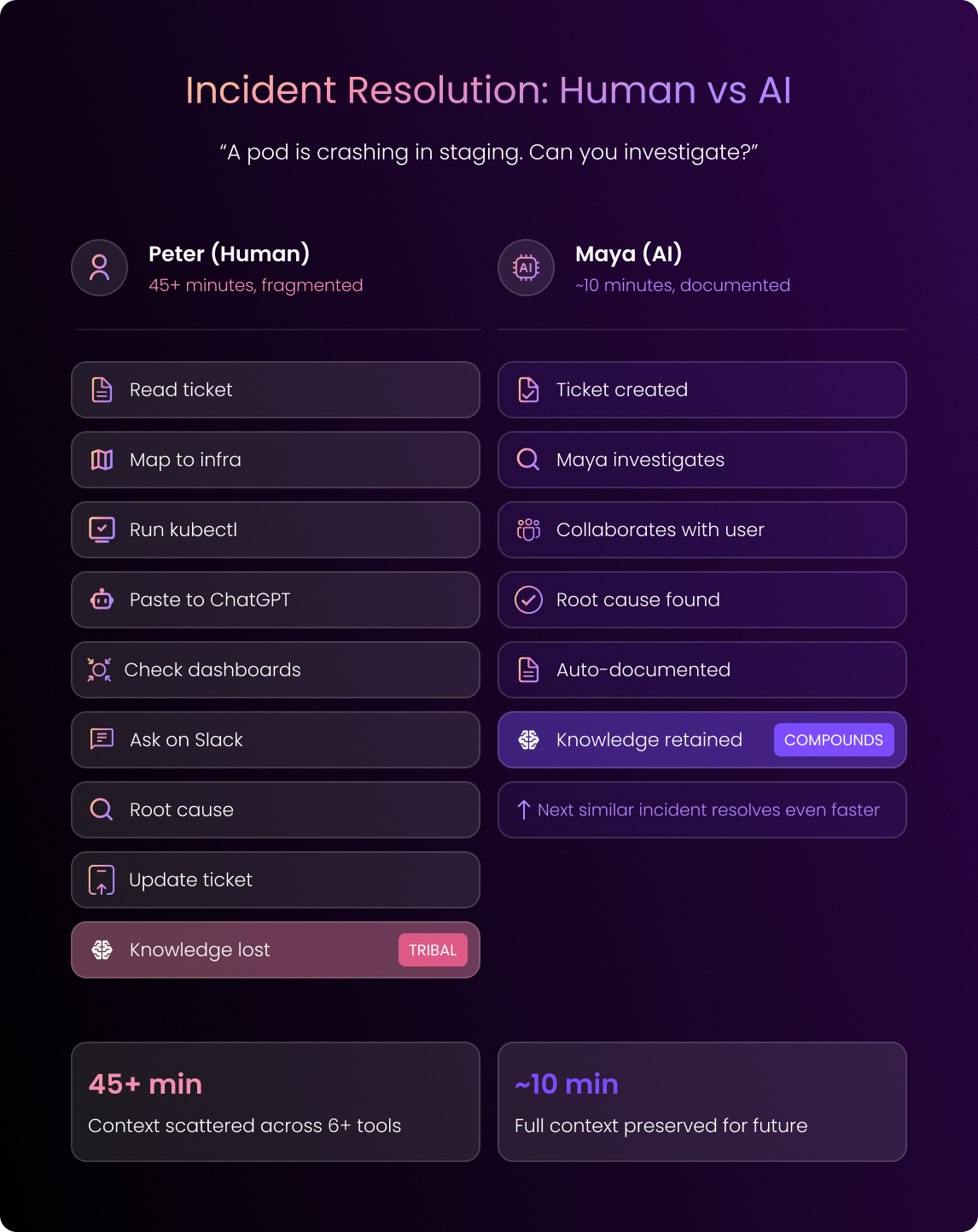
Here’s what that looks like: He reads the ticket, he maps the service name to the actual cluster, he runs kubectl commands, and he pastes the output into ChatGPT.
Next, he checks the dashboards and asks around on Slack.
Eventually, Peter finds the root cause.
Now, he can update the ticket.
But almost all of the process of the debugging context Peter went through stays in his head.
So it won’t help the next person that comes along.
Stage 4: The Work Gets More Complex
Next, Peter will start taking on more complex tasks. Let’s say a developer needs MongoDB in the dev cluster.
Peter reviews the ticket, and he immediately realizes that critical info is missing. So, he kicks it back.
Now, Peter and the developer go back and forth about cluster mode, resource limits, and security settings. Productivity founders.
Eventually, Peter does deploy it, and the developer tests it and finds issues.
Yep, you guessed it. The cycle repeats.
The bottom line? What should have taken hours took days.
Stage 5: Changes in Production
Once Peter really gets on a roll, he may find himself in a production change issue. Let’s say he needs to add a new auto-scaling group and update a microservice to run on those workers.
Here’s what he does:
He pulls the IaC, sets up credentials, and runs the Terraform plan.
From there, he generates changes with Claude Code and executes with Terraform and Helm.
Finally, he jumps between the AWS console, Kubernetes Lens, and Grafana to validate the work.
“Great.” You think. “He’s killing it.”
Except… all the context from this work lives in Peter’s head.
Peter is now indispensable to your team, which makes him a single point of failure. Or, worse, he’s poached from your competitor, and he leaves.
And he takes all that knowledge with him
You cannot possibly go on like this, hemorrhaging this level of investment in employees only to see them leave.
The Better Move: Onboard an AI DevOps Engineer Instead
Now, let’s imagine those same stages with an AI DevOps Engineer.
We’ll call her Maya.
Stage 1: Onboarding (Minutes)
You create a new “Engineer” in the DuploCloud portal.
Super simple: You grant access to specific infrastructure and IaC repos, and, of course, you start with read-only.
This takes minutes.
Let’s see how it goes.
Stage 2: Knowledge Transfer (2-4 Hours)
Maya runs discovery automatically, and she orchestrates specialized agents for each system. Then, she runs kubectl commands, terraform plans, and API calls.
Finally, she reads your documentation.
Within hours, she’s generated your topology reports, IaC coverage analysis, and markdown documentation in your repos.
All you have to do is drive the process through tickets, adding context and correcting outputs.
Maya, of course, learns from all of your feedback and stores what she learns for future use.
Stage 3: Her First Real Tasks (~30 Minutes)
Okay, now Maya’s ready to take on her first tasks.
Imagine a user reports a crashing pod, so they open a ticket with Maya.
Maya confirms she’s taken the ticket, and she begins investigating in real time. She collaborates with the user, and, within minutes, she identifies the root cause.
She then syncs the session to your ticketing system with full context.
The entire debugging session gets stored, so now, Maya can resolve future similar issues even faster.
Stage 4: The Work Grows Complex (Still Just Minutes)
As Maya grows more confident, she’ll take on more complex tasks:
Let’s say a developer needs MongoDB in dev, so they open a ticket with Maya.
Maya will, again, confirm visibility and probably ask a few clarifying questions.
She’ll then deploy MongoDB and let the developer test the deployment immediately.
If something needs adjustment, the developer can tell Maya in the same session.
She can then fix it, the tests will pass, and Maya can close the ticket.
What took Peter days takes Maya minutes.
Stage 5: Changes in Production with Maya (But Also With Human Oversight)
As Maya grows even more advanced, she takes on still more complex work.
Imagine a DevOps engineer needs to add a new auto-scaling group, so they connect to Maya through the IDE extension.
Maya provides scoped, just-in-time credentials, and the engineer asks Maya to check if the cloud state matches IaC.
Maya runs the Terraform plan and confirms sync.
The engineer can now describe the task in plain English, and Maya can make any code changes.
The engineer reviews.
Maya runs the Terraform apply with approval.
What’s changed here?
- Every step gets logged.
- Every decision gets documented.
- And the context gets preserved.
Maya only grows more supportive and more capable.
The Difference
| Human (Peter) | AI (Maya) | |
| Onboarding | Days to weeks | Minutes |
| Knowledge transfer | Weeks to months | Hours |
| Simple incident | Hours + context loss | Minutes + documented |
| Service deployment | Days + back-and-forth | Minutes + interactive |
| Production changes | Days + tribal knowledge | Hours + institutionalized |
| Knowledge retention | Walks out the door | Permanent |
It’s Guardrails That Really Make This All Work
Obviously, you wouldn’t give a new hire production access on day one. The same principle applies here.
You’ll put guardrails into place to make sure your AI DevOps Engineer stays consistent and continues to develop at a rapid pace.
Here are some of those guardrails:
- Permission inheritance: Maya will use your existing RBAC. Basically, if an engineer can’t delete production pods, neither can Maya.
- Human-in-the-loop: Maya can propose changes, but she must wait for approval on anything consequential. She can investigate and prepare, but humans will make the final call.
- Full audit trails: Maya will log every action, decision, and change, with attribution.
- Environment isolation: When Maya is working in staging, she can’t touch production. Architectural enforcement is not a policy she promises to follow.
- Progressive trust: Remember to start Maya with read-only access to non-production. Then, you can expand her scope as you gain confidence in her abilities and production.
What We’re Seeing in Production
At DuploCloud, we’ve run AI DevOps Engineers at regulated enterprises for over a year in a variety of industries, including healthtech, government, and GRC platforms.
Here’s what we’ve found:
- 60% of common Kubernetes issues auto-resolve without human intervention
- The mean time to resolution drops significantly
- Teams get 10-15 hours per week back
- Knowledge compounds instead of walking out the door
Don’t Take Our Word for It. Try It Yourself
You really don’t have to jump in with both feet, blindly. We’ve built a sandbox where you can experience this firsthand without risk.
You can create tickets, watch Maya investigate, and see how human-in-the-loop approvals work.
What’s more, you can test the guardrails to get a feel for the process.
And no, you don’t even have to take a sales call to get started.
👉 Try the Duplo sandbox to explore how application-aware AI DevOps Engineers work in practice.