Introduction
In chapter 1 of our blog series, we described our learnings about the limitations of how AI is currently being implemented for enterprise DevOps use cases. In these subsequent parts we will describe the solution we built that addresses those limitations — one that can make AI as mainstream in DevOps as it has become in coding, GTM, and legal.
This chapter is about the first building block — Agent Runtime for Multiplayer OpeRations (ARMOR). It is a generic framework that enables multiple users to interact with AI in a single unified interface to accomplish DevOps tasks. The ARMOR framework brings together, in a single interface:
- Multi-player live AI sessions
- Centralized context
- Workspaces each with their RBAC and access to cloud resources
- Determinism and SLA
- Token cost management
- Skill distribution and templates for repetitive tasks
- Audit trails
- Security and compliance, including secrets management and human-in-the-loop
- Fault handling and retries
- Alerts and notifications
- Scale and performance
- Token-less analytics
DuploCloud has two additional layers that we will introduce at a high level here and describe in detail in subsequent parts.
To recap chapter 1, AI is used in two modes in enterprises today:
Personalized Agent (Claude Code)
The most successful and widely adopted approach but inherently single player. It works great for coding tasks where each feature or PR is scoped to an individual. But in operations, most tasks are collaborative in nature and the live state of the system when a certain action is taken in an AI session is very important and needs to be preserved and shared. Take the most basic example where an Ops engineer starts off investigating a ticket — it has all the live context. But when they wish to hand it over to colleagues, it’s not possible to share a live session with personalized agents.
Managed and Centralized Agents
To address the need for a centralized AI system, enterprise teams today build several independent agents hosted in their own infrastructure or using managed agent frameworks by Anthropic or OpenAI. The key drawback is not only that they have to manage the deployment for multiple agents, but for each agent they have to solve RBAC, access control, token management, skill distribution, security, compliance, and other capabilities noted in ARMOR. In fact, the RBAC and access control problem is so complex to solve that most of the agents are either non-interactive (just perform pre-configured autonomous jobs) or only have limited read access. The end result is that while users feel powerful in Claude Code, these agents built by the operations team have very limited capabilities like triaging a build or investigating an incident.
Chapter 1 formally categorizes and describes twelve common capabilities that every enterprise DevOps agent needs.
Three Layers. One Platform.
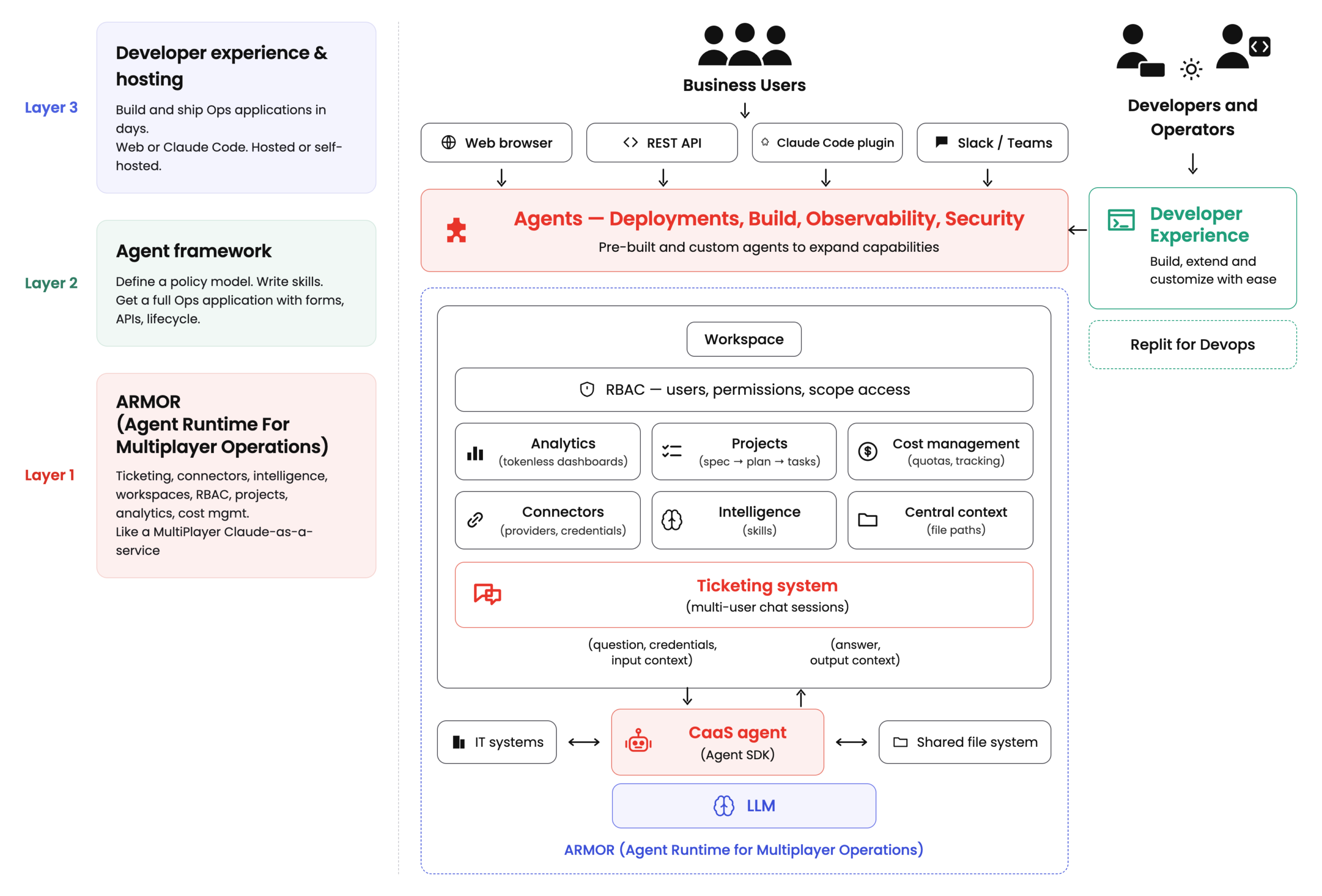
The DuploCloud Platform is a three layer architecture.
Layer 1 — ARMOR: Agent Runtime for Multiplayer Operations
The foundation. ARMOR implements all twelve enterprise requirements — ticketing (multi-user AI sessions), connectors (secure access to IT systems), intelligence (skills and business logic), centralized context (organizational memory), workspaces and RBAC, projects (spec-driven workflows), determinism, token-less analytics, and cost management. Every interaction with AI happens inside a ticket.
Layer 2 — Agent Framework: Custom Automation Workflows
Build your own custom workflows based on specific business needs. Define a resource taxonomy (Network → Cluster → Environment → Workloads). Write skills for each resource type. The framework generates forms, REST APIs, list views, status tracking, and dependency enforcement. All ARMOR capabilities are inherited automatically. DuploCloud ships with a default DevOps agent covering Deployment, Security, Observability, and CI/CD — with multiple compliance standards out of the box.
Layer 3 — Studio: Developer Experience & Hosting
Imagine Replit for DevOps. With DuploCloud Studio, operators can build and deploy their automation platform in hours. Open a web interface or launch Claude Code with the DuploCloud plugin. Define your policy model, write skills, connect providers, configure workspaces, onboard users. Managed DevOps services hosted by DuploCloud, or self-hosted on your own Kubernetes infrastructure.
This part focuses on ARMOR — the foundational runtime that makes everything above it possible. Agents and Studio are covered in subsequent parts.
Architecture Overview
A foundational piece of ARMOR is a “ticket” — basically an AI session or thread. But the key insight is that we built our entire architecture around the ticket: the ticket is the unit of ALL work, the audit trail, the collaboration surface, and the cost boundary. Everything else — connectors, skills, workspaces, projects, analytics — exists to feed context into tickets and consume results from them.
The ARMOR Backend — a single deployable service containing the ticketing system, all functional modules (connectors, intelligence, context, projects, analytics, cost management), workspace management, and RBAC. Users interact through a web browser, REST API, Claude Code plugin, or Slack/Teams.
The ARMOR Agent — a separate service built on the Agent SDK from the LLM Vendors like Claude, OpenAI, and Gemini. For other models, OpenCode. It receives work from the ticketing system as questions, credentials, and input context. Returns answers and output context. Scales horizontally with multiple replicas.
The LLM — foundational models called by the agent for reasoning, planning, and execution.
The Ticketing System — Foundation
The ticketing system is the heart of the ARMOR architecture. Every interaction with AI — whether a one-off question, a step in a complex project, a dashboard creation, or a resource provisioning operation — happens inside a ticket. A ticket is not just a chat thread. It is a multi-user AI session with the following properties:
Connectors — Secure Access to IT Systems
Connectors are how the platform reaches the outside world. They consist of three concepts:
Providers
Any IT system — AWS, Azure, GCP, Kubernetes, GitHub, Datadog, PagerDuty, ServiceNow, or any system accessible via MCP servers.
Credentials
API keys, service account tokens, certificates. Stored securely, never exposed to users. Users select scopes, never handle credentials directly.
Scopes
Provider + credential + granular access controls (regions, namespaces, resource types). Reusable across workspaces. What users select when creating a ticket.
This three-tier model solves the credential safeguarding problem. The agent operates with enterprise credentials, but those credentials flow through the system without ever being visible in a conversation, a prompt, or an AI response.
Intelligence — Skills and Business Logic
In traditional DevOps SaaS, business logic is hardcoded by the vendor. In ARMOR, business logic is expressed as Skills — instructions that tell the agent how to behave and what capabilities it has.
A Skill is a folder containing a SKILL.md file with metadata, instructions, and optionally scripts, templates, and reference materials. There are three types:
Platform Skills
Pre-built capabilities shipping with the platform. Baseline troubleshooting, dashboard creation, project management.
Custom Skills
Created by the customer’s team. Encode your organization’s specific workflows, policies, and operational practices.
Business logic is user-owned and user-modifiable. An organization can fork a platform skill and customize it — adding their own tagging policies, compliance requirements, or architectural standards — without waiting for a vendor update.
Personas
A Persona bundles related Skills by role or function. An SRE Persona might combine troubleshooting, monitoring, and incident response skills. A Provisioning Persona could bundle Terraform and Kubernetes deployment skills. Personas can include system prompts that shape the agent’s overall behavior. In a ticket, users select a persona instead of individual skills.
Central Context — Organizational Memory
Desktop agents suffer from context amnesia — when a session ends, everything the agent learned disappears. In ARMOR, all context is centralized. Every ticket’s inputs, outputs, reasoning chains, and artifacts are stored in a shared file system accessible to the workspace.
Context Persists Across Sessions
When one engineer diagnoses a DNS misconfiguration on Monday, the resolution is part of workspace context. Another engineer encountering a similar issue Thursday already has the history.
Context Compounds Over Time
Every ticket adds to the workspace’s knowledge base. Reports, artifacts, configs, and decision logs accumulate. The workspace gets smarter with use.
Context is workspace-scoped. One team’s operational history doesn’t leak into another team’s workspace. Organizational separation is preserved.
Workspaces and RBAC
The Workspace is the organizational container that binds scopes (which IT systems are available), personas (which skills the agent has), users (who can access it), and context (accumulated files and outputs). Tickets, projects, dashboards, and resources all live within a workspace.
Create multiple workspaces — one per team, per environment, per business unit. An L1 SRE workspace might have read-only access to infrastructure with an SRE Persona. A Platform Engineering workspace might have full write access with a Provisioning Persona.
All access control is built around workspaces. RBAC governs which users access which workspaces, and which scopes they use within each. Every AI action is traceable to a specific user, within a specific workspace, using a specific scope — providing the auditability that SOC 2, HIPAA, and PCI-DSS require.
Projects — Spec-Driven Workflows
Complex, multi-step initiatives — migrating infrastructure, setting up a new environment, implementing a compliance framework — need structure. Projects provide it:
1 Spec
User provides high-level requirements. Agent collaborates to produce a detailed specification. Reviewed and approved before work begins.
2 Plan
Agent generates a step-by-step implementation plan. Tasks organized into stages — parallel within a stage, sequential across stages.
3 Tasks → Tickets
Each task becomes a ticket. Concurrent execution within stages for speed, sequential stages for predictability. The AI does the work; the human owns the decisions.
Token-Less Analytics
Fifty engineers checking the same deployment status dashboard means fifty inference cycles for identical information. ARMOR implements token-less analytics: dashboards are created through tickets, but they run without AI.
When a user asks for a dashboard, the agent designs it — understanding data sources, generating query logic, building visualization scripts. These artifacts are saved. From that point forward, refreshing executes only the scripts, pulling data from source systems without a single LLM call.
AI should create the dashboard. It shouldn’t run the dashboard. The intelligence is in the design, not in the rendering.
Cost Management
Token cost is the single biggest blocker to enterprise AI adoption. ARMOR treats cost management as a first-class architectural concern:
Per-Ticket Tracking
Every ticket records token consumption at every chat turn. Full visibility by ticket, user, and workspace.
Quotas
Token quotas at workspace, project, and ticket levels. Production SRE gets higher quotas than dev sandbox. Warnings before limits.
Usage Analytics
Cost data aggregated across workspaces, teams, and time periods for planning, budgeting, and optimizing AI spend.
The ARMOR Agent
The ARMOR Agent is a separate service built on the Claude SDK — internally running the same Claude CLI that runs in Claude Code on your desktop. When the ticketing system dispatches a ticket, the agent receives the question, credentials, and input context. It returns the answer and output context.
The agent is intentionally thin. No domain tools or vertical logic — that belongs in Skills. The agent implements the plumbing that makes an LLM SDK safe, multi-tenant, and enterprise-grade:
1 Session Isolation
Every ticket gets its own working directory. No read or write can cross from one ticket’s directory to another’s.
2 Credential Translation
Backend passes credentials as structured data. Agent translates to kubeconfig, AWS credential files, GCP application default credentials. LLM never sees raw credentials.
3 Skill Provisioning
Skills live on the shared file system, versioned by the backend. Agent maps assigned skills into the session directory before execution.
4 MCP Server Configuration
External capabilities surfaced via MCP servers. Agent writes configuration before execution begins.
5 Sandboxing
All shell execution in a sandbox. File system constrained to the ticket’s scope. Boundary enforced at the OS level, not the prompt level.
Further documentation on ARMOR is available at docs.duplocloud.com/docs.
What’s Next
ARMOR is the foundation — the multiplayer agent runtime that delivers all enterprise capabilities identified in Part 1. But the power of the platform is in what gets built on top of it.
In the next chapter, we introduce the Agent Framework — how domain-specific resources, workflows, and integrations turn ARMOR from a runtime into a fully featured Ops application.