Introduction
In the first chapter of our blog series, we described the current limitations of AI implementation for enterprise DevOps use cases. In the second chapter we introduced ARMOR — the Agent Runtime for Multiplayer Operations — a generic framework that enables multiple users to interact with AI in a single unified interface to accomplish DevOps tasks.
ARMOR brings together, in a single interface, functionalities around multiplayer live AI sessions, centralized context, workspaces with RBAC and cloud resource access, determinism and SLA, token cost management, skill distribution and templates, audit trails, security and compliance, fault handling and retries, alerts and notifications, scale and performance, and token-less analytics.
With ARMOR established as a multiplayer agent orchestration layer, the main user interface remains natural language — which does not scale for repetitive daily usage. Instead of using a web form, CLI, or API, imagine always having to type in plain English every time you launch or update a microservice in Kubernetes: “Can you deploy my API backend with the image myapi:abcd, with environment variables as…” — an unsustainable user experience. Natively, AI is just English-in, English-out. What we need are repetitive workflows specialized by an industry vertical such as DevOps, designed not just for ease of use but also to bake in best practices and administrative functions.
Think of it this way: ARMOR is a platform where users interact with AI through conversations and projects. The Extension Framework lets you build an application where users interact through forms and structured workflows — workflows that trigger tickets using AI, API calls, or scripts to accomplish tasks.
The DuploCloud DevOps Extensions
DuploCloud ships with a comprehensive, battle-tested set of extensions for cloud operations built on the Extension Framework. This is not a starter template or a demo. It is a production-grade DevOps platform validated and operational in hundreds of customer environments, covering the full spectrum of cloud infrastructure operations — from infrastructure provisioning and application deployment through observability, CI/CD, security, and compliance. Multiple compliance standards are implemented out of the box.
The default extension includes coverage across every major DevOps function:
Deployment
Infrastructure provisioning, application deployment, environment management. Networks, clusters, namespaces, workloads, configs, storage.
CI/CD
Build pipelines, deployment automation, release management. GitHub Actions, GitLab CI, Jenkins, ArgoCD.
Observability
Monitoring, logging, alerting, dashboards. Datadog, New Relic, CloudWatch, Prometheus, Grafana.
Compliance
SOC 2, HIPAA, PCI-DSS, ISO 27001. Policy enforcement, evidence collection, audit report generation.
Security
Vulnerability scanning, IAM management, secret rotation, network policy enforcement. SIEM integration.
Cost Optimization
Cloud spend analysis, right-sizing, reserved instance management, budget alerts across AWS, Azure, GCP.
Customers adopt the platform in three modes:
Use as-is
Deploy and start operating immediately. Hundreds of customers run production with out-of-the-box setup and no changes.
Day one
Customize
Fork skills, modify specs, add tagging policies, adjust compliance rules. User-owned — change without waiting for a vendor.
Your standards
Build your own
Write a completely new extension for any operations function unique to your organization. Build any number of new extensions.
Unlimited
How an Extension Works
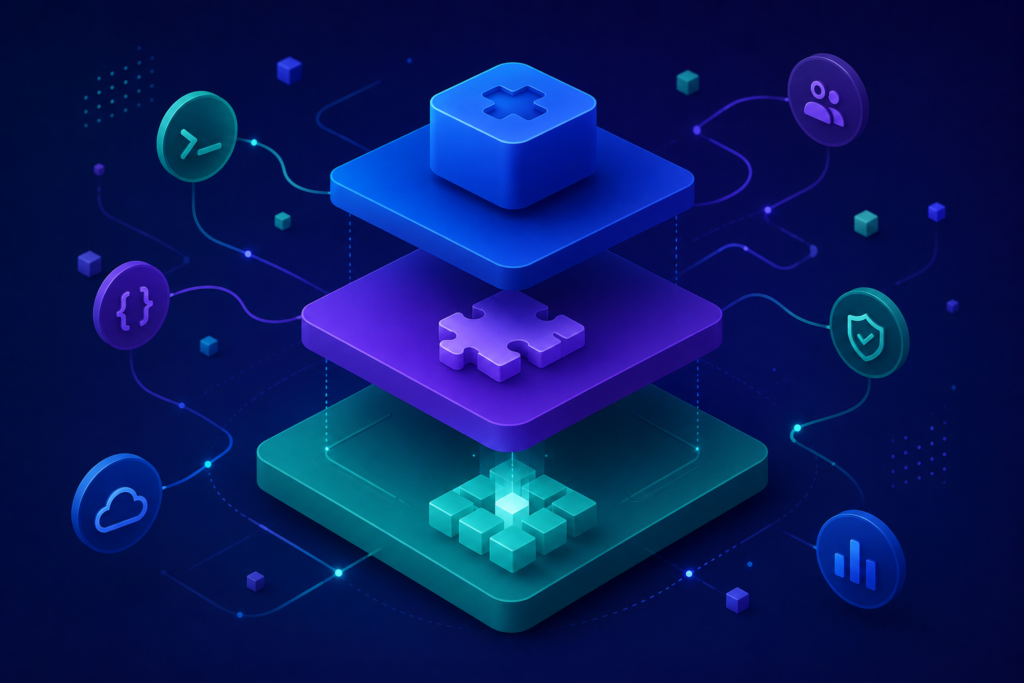
An extension is a domain-specific application built on top of ARMOR. To build one — or to understand how the default DevOps extension works — you need three concepts.
1. The Policy Model
The policy model is a taxonomy of resources — the domain-specific objects the application manages. In the DevOps extension, resources mirror how cloud infrastructure is organized:
Each resource type defines four things:
Spec — what the user wants
A typed specification capturing intent. For a Cluster: network source, cluster type, EKS version, API visibility, control plane logging. Becomes a form and an API contract.
Result — what was produced
A typed output capturing the outcome. For a Cluster: EKS ARN, node groups, endpoint URL, kubeconfig. For an Environment: security groups, IAM roles, KMS keys.
Dependencies — what needs what
Resources form a hierarchy. A Cluster requires a Network. An Environment lives inside a Cluster. Dependencies are enforced — the UI shows only valid options.
Status lifecycle
Every resource: New → Provisioning → Ready (or Failed, Blocked). Updates trigger reconciliation. Deletes trigger deprovisioning. The framework manages state transitions.
2. Skills for Each Resource Type
Each resource type has skills — the instructions that tell the AI agent how to provision, update, troubleshoot, and deprovision that resource. A Network skill might contain a CloudFormation template. A Cluster skill might contain EKS provisioning scripts. The skill is the business logic — user-owned, not vendor-hardcoded.
3. The Framework Does the Rest
Once resources and skills are defined, ARMOR provides everything else automatically: multi-step forms with validation, REST APIs for every resource type, list views with status tracking, detail views with Spec/Result tabs, automatic ticket creation, cost tracking per resource, RBAC inherited from workspaces, and “Track Provisioning Status” links to the underlying ticket.
Define your resources and their taxonomy. Write your skills. The platform gives you a fully featured enterprise DevOps application — complete with RBAC, workspaces, determinism, analytics, cost management, centralized context, alerts, notifications, and fault tolerance.
The Resource Lifecycle
Every resource in the Extension Framework follows the same lifecycle:
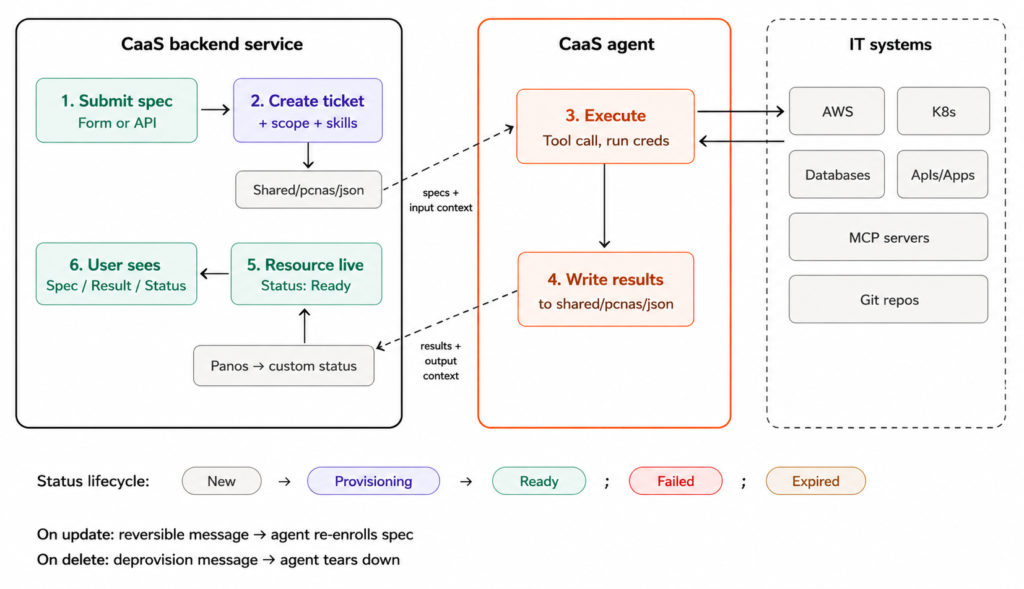
Resource lifecycle diagram — user submits spec, platform creates ticket, agent executes, writes results, resource goes live.
1 User submits a spec.
Through the UI form or API — name, scope (which cloud account), optional skill overrides, and domain-specific fields.
2 Framework creates a ticket.
Automatically creates a ticket in the user’s workspace. Attaches credentials, resolves skills, writes the spec as JSON to the shared file system.
3 Agent executes.
Reads the spec and skill instructions, provisions the EKS cluster, configures node groups, sets up IAM roles. The user watches live on the ticket.
4 Agent writes the results.
Writes a structured output file. The framework parses it into the resource’s typed Result and updates the status.
5 Resource is live.
Spec tab, Result tab, status badge, timestamps, and a “Track Provisioning Status” link to the underlying ticket.
Updates and Reconciliation. When a user modifies a spec, the framework sends a reconciliation message. The agent handles the delta — no full teardown and rebuild.
Deprovisioning. When a user deletes a resource, the agent handles cleanup. Dependencies are respected — you cannot delete a Network while Clusters depend on it.
Token-less Resource Provisioning
We leverage the full power of AI when provisioning complex cloud resources that have multi-step dependencies. But what about DevOps functions that are simple API calls to the subsystem — like restarting a pod or creating a Kubernetes secret?
A ticket is still associated with each resource, containing all the context, but it is not used for mainline provisioning and update workflows. Instead it remains available for troubleshooting and bespoke needs.
Example Workflows in the DuploCloud DevOps Extension
The following examples illustrate how the Extension Framework delivers a traditional enterprise application experience — forms, status tracking, dependency chains — while AI handles all the heavy lifting underneath.
Example: Creating a Cluster with Dependency Enforcement
The cluster creation form demonstrates the dependency chain in action. The “Network Source” field offers two options: “Choose Network” (select from provisioned networks — region, VPC, and subnets inherited automatically) or “Choose VPC” (manual entry). The framework enforces that a cluster cannot be created without a network.
The spec captures everything the agent needs: network source, cluster type, EKS version, API server visibility, control plane logging, and cluster IP CIDR. The user clicks “Create & Provision” and the system creates a provisioning ticket. The agent provisions the entire EKS cluster in real time.
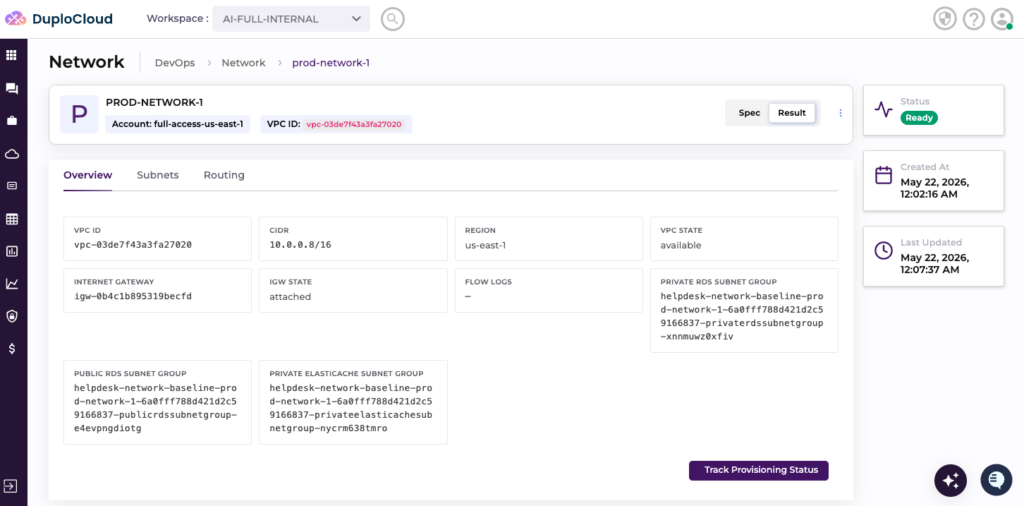
VPC ID, CIDR, Region, Internet Gateway, Subnets and Routing tabs. Status: Ready.
Creating a Cluster. The cluster form demonstrates the dependency chain. The “Network Source” field offers two options: “Choose Network” (select from provisioned networks – region, VPC, and subnets are inherited automatically) or “Choose VPC” (manual entry). The framework enforces that a cluster cannot be created without a network.
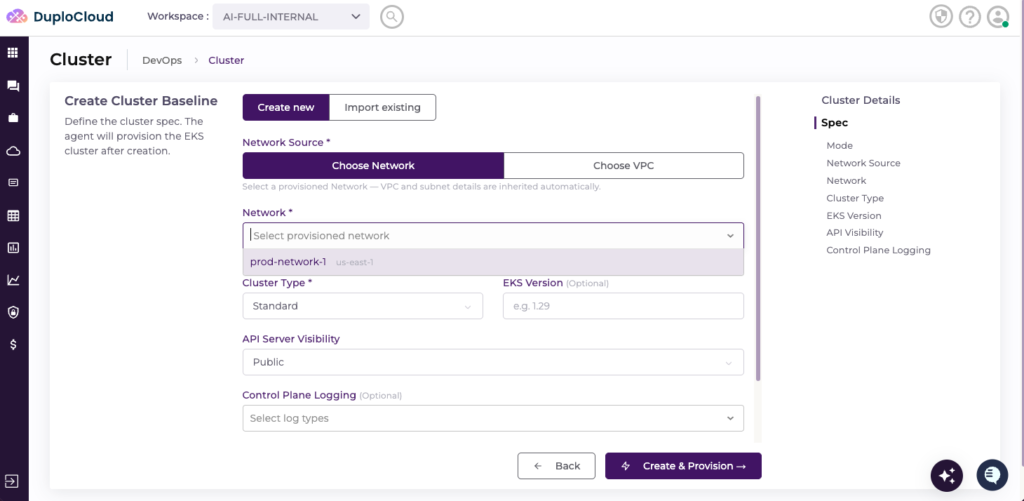
Cluster creation form — Network Source shows the dependency chain.
Example: Navigating an Environment
Once a cluster is provisioned, teams create environments inside it. The environment is the deployment boundary — containing security groups, IAM roles, and KMS keys.
The environment detail view shows the full resource tree in the left navigation: Overview, Microservices, Kubernetes (Namespaces, Nodes, Workloads, Configs, Storage, Networks), and Cloud Resources (Hosts, Serverless, Storage, Databases, Networks, Configs). Each sub-resource has its own list view, create form, and detail view. Spec/Result tabs are available throughout. A “Track Provisioning Status” button links to the underlying ticket.
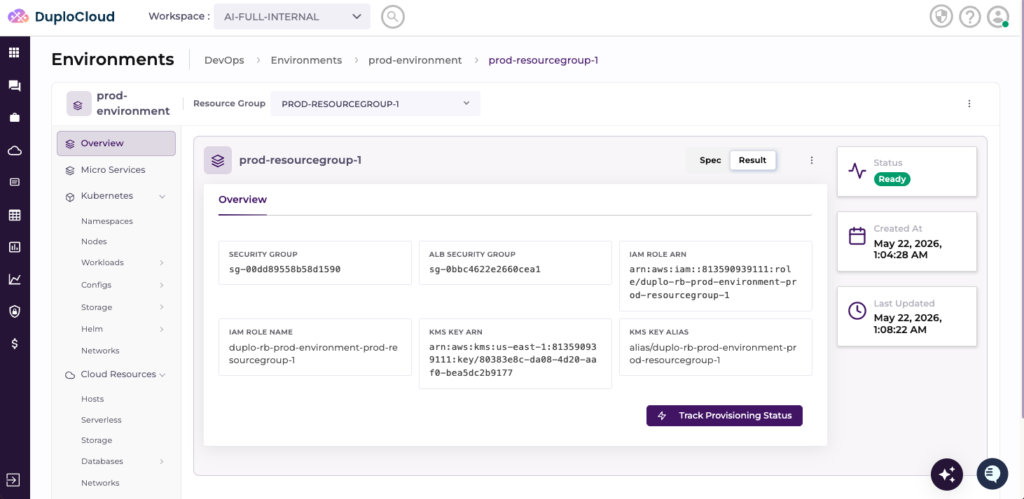
Full resource tree in the left nav. Security groups, IAM roles, KMS keys in the overview. Spec/Result tabs. Track Provisioning Status links to the underlying ticket.
This is the pattern at work. The user fills out a form. The framework creates a ticket. The agent provisions the infrastructure. The user sees the result in a familiar enterprise UI. Every operation is multiplayer, auditable, and cost-tracked.
Skills in Action
The DevOps extension ships with platform skills like duplo-aws-infra that contain CloudFormation templates, IAM policies, security group rules, and provisioning scripts. Users can view these skill files directly from the ticket. Because skills are user-modifiable, an organization can fork a platform skill and customize it — adding their own tagging policies, compliance requirements, or architectural standards — without waiting for DuploCloud to ship an update.
Extending Beyond the Default
The default DevOps extension is comprehensive — but it is not the ceiling. The Extension Framework is designed so that organizations can extend the platform in two ways.
Customize the Default Extension
Every skill in the default extension is user-modifiable. Organizations routinely customize the platform: adding custom tagging policies, modifying network topologies for their multi-account strategy, adding compliance guardrails specific to their regulatory environment, or integrating with internal tools. Customizations are persistent — they survive platform upgrades because the skill layer is separated from the framework.
Build New Extensions
Organizations can also build entirely new extensions that sit alongside the default DevOps extension on the same ARMOR runtime. A platform team might build an extension for their internal developer platform. A security team might build one for vulnerability management. A data engineering team might build one for ML pipeline orchestration.
Each extension defines its own resource taxonomy, skills, and workflows — but shares the same ARMOR runtime underneath. Workspaces, RBAC, cost management, ticketing, and context are all inherited. A single DuploCloud deployment can run multiple extensions simultaneously.
What This Means
A production-ready platform.
The default DevOps extension is comprehensive and battle-tested across hundreds of customers. Deploy it and start operating production infrastructure on day one.
Complete customizability.
Fork any skill, modify any resource spec, add any workflow. The platform adapts to your organization’s specific standards, policies, and architectural patterns.
Unlimited extensibility.
Build entirely new extensions for any operations function. The same framework that powers cloud infrastructure provisioning can power your internal developer platform, compliance automation, or any other structured operational workflow.
DuploCloud doesn’t ship one rigid DevOps tool. It ships a comprehensive, battle-tested DevOps platform — and gives you the framework to extend it in any direction your organization needs.
What’s Next
ARMOR provides the runtime. Extensions provide the applications. But building and deploying extensions should be as easy as the applications they create.
Coming soon in our roadmap: DuploCloud Studio — the developer experience layer that lets operators build, customize, and ship DevOps applications. You can build prototypes in minutes and a fully deployed internal platform in a few days. Think Replit for DevOps: open a web interface or launch Claude Code with the DuploCloud plugin, define your policy model, write your skills, and ship a fully hosted platform.