Why DevOps Teams End Up With AI Agent Sprawl, and What Actually Fixes It
The problem isn’t AI capability. It’s that desktop AI is single-player, and DevOps is multiplayer. The result: a sprawl of AI tools for DevOps that’s more expensive and less capable than the Claude session on a laptop.
A Pattern We’ve Seen Everywhere
We gave our engineers Claude. They loved it. Everyone became more productive almost overnight. Kubernetes debugging that took half a day? Solved in minutes. Terraform modules that needed a specialist? Claude wrote them. Incident triage, compliance documentation, migration planning — one agent on one laptop outperformed a dozen point solutions marketed as ai powered devops tools.
Then we looked at what we’d actually deployed for the broader organization.
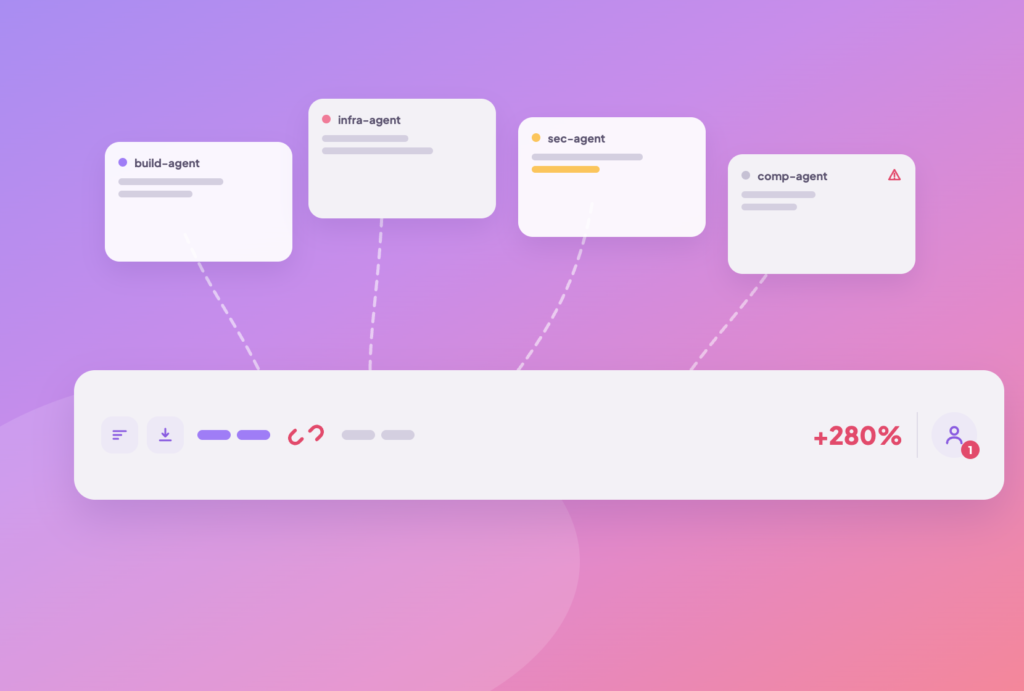
Not one Claude. Not a shared Claude. A sprawl of independent agents — an incident triage agent, a deployment agent, a compliance scan agent, a cost analysis agent. Each deployed separately. Each with its own infrastructure. Each with its own credential management. Each with its own token budget that nobody was tracking.
We realized we weren’t alone. Every DevOps team we talked to was hitting the same wall, and most of them were shopping for the same thing: a better multi-agent orchestration platform to manage the sprawl. That turned out to be the wrong fix. More on that below.
How We Ended Up With Agent Sprawl
The answer is surprisingly simple. Claude Code is extraordinary, but it’s architecturally single-player. One user, one session, one machine. When we tried to make it work for the whole organization, we hit every problem single-player doesn’t have.
1 Shared sessions
An incident at 2 AM needs to hand off to the morning shift with full context. Can’t do that with a desktop agent. So we built a centralized agent.
2 Credentials
AWS keys, Kubernetes service accounts, Vault secrets can’t sit on everyone’s laptop. So we built another agent with centralized credentials.
3 RBAC
A junior developer shouldn’t deploy to production. Claude Code has no concept of permissions. So we locked the agent down and locked out most of its capability.
4 Token cost
Fifty engineers asking the same question about the same failing service, each burning tokens independently. The math didn’t work.
5 Audit trails
SOC 2 requires knowing who did what. Claude Code sessions vanish when the terminal closes.
6 Determinism
A Terraform plan that varies between runs is fine for prototyping. It’s a non-starter for production deployments.
So for each problem, we deployed a new agent. An incident agent with read-only access. A deployment agent with a hardcoded workflow. A compliance agent running on a cron job. Each one solving one narrow problem, each one requiring its own deployment pipeline, its own security review, its own monitoring. We didn’t choose agent sprawl. We were forced into it because the only AI tool that actually works, Claude on a laptop, is architecturally single-player.
The Hidden Costs of Agent Sprawl in AI-Powered DevOps
Agent sprawl isn’t just messy. It’s expensive and risky in ways that aren’t immediately visible, and it’s a pattern we now see across nearly every team that has tried to bolt AI onto operations one narrow tool at a time.
Internal DuploCloud analysis
Ungoverned token budgets
Each agent had its own token consumption with no central visibility. One agent got abused by well-meaning engineers and blew through a quarter of our AI budget in a week.
Cost risk
RBAC solved per agent
Each agent needed its own access control. The problem was so hard that we gave up on most and made them either non-interactive or read-only. Capability collapsed.
Capability loss
No shared context
The incident agent didn’t know what the deployment agent did. The compliance agent couldn’t see the troubleshooting history. Every agent started from scratch, every time.
Wasted spend
Security review multiplied
Every agent that touched production credentials needed its own security review. Ten agents meant ten reviews, ten attack surfaces, ten credential stores to protect.
No organizational memory
When one agent resolved an incident, that knowledge didn’t transfer. The next engineer asking a similar question, through any agent, started from zero.
We hadn’t built a platform. We’d built a patchwork. And the patchwork cost more and did less than the Claude session on a laptop.
The Root Cause: Operations Is Multiplayer, Not Multi-Agent
When we stepped back, the root cause wasn’t a tooling problem. It was an architectural mismatch, and it’s one worth naming clearly because it’s easy to misdiagnose as a need for more agents rather than a better runtime.
Claude Code is built for innovation, single-player work. Writing code, designing features, prototyping. One person, one machine, deep focus. It’s perfect for this.
DevOps is multiplayer work. Managing shared infrastructure. Troubleshooting incidents across shifts. Coordinating deployments across teams. The live state of the system when an action is taken matters, and that state must be shared.
| Requirement | Sprawl of single-player agents | Multiplayer AI platform |
|---|---|---|
| Shift handoff with context | ❌ | ✅ |
| Centralized credentials | ❌ (per agent) | ✅ |
| RBAC enforced at platform level | ❌ | ✅ |
| Token cost visibility by team | ❌ | ✅ |
| Persistent audit trail | ❌ | ✅ |
| Shared organizational memory | ❌ | ✅ |
| Full Claude-level capability | ❌ (collapses under RBAC) | ✅ |
This is the trap a lot of teams fall into when evaluating multi-agent ai systems: the instinct is to add coordination on top of the sprawl rather than remove the sprawl itself. What we were doing was deploying many single-player agents and trying to make them behave like a multiplayer system, building RBAC per agent, managing credentials per agent, tracking costs per agent, solving the same dozen infrastructure problems a dozen times.
What we actually needed was one multiplayer platform that solves RBAC, credentials, cost management, audit trails, shared context, and human-in-the-loop once, and lets the team focus on writing the DevOps-specific logic (skills) that makes AI genuinely useful for the organization.
The Fix: Don’t Build More Agents. Share Claude.
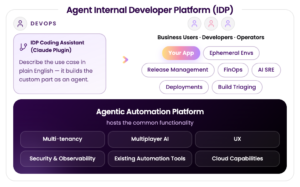
The answer isn’t a heavier multi-agent orchestration platform stacked on top of the sprawl. It’s a centralized “Claude-as-a-service” layer for the DevOps organization, a multiplayer AI platform where the common enterprise capabilities are solved once, and the team focuses on what’s unique to them.
What does multiplayer Claude for DevOps actually mean in practice?
Shared AI sessions
Multiple engineers in the same live session. The 2 AM on-call hands off to the morning shift with full context: pod state, actions taken, hypotheses tested.
Centralized credentials
AWS keys, Kubernetes tokens, and Vault secrets are managed centrally. Engineers select a scope when creating a ticket. They never see or handle credentials.
RBAC built into the platform
A junior developer deploys to staging. A senior SRE deploys to production. The platform enforces it, not a per-agent hack.
Token cost as a platform concern
Per-ticket tracking, workspace quotas, and usage analytics. Finance sees exactly what AI costs, broken down by team, project, and user.
Organizational memory
Every session, resolution, and infrastructure change feeds a shared knowledge layer. The workspace gets smarter with use.
One agent, not twelve
Built on the Claude SDK directly. No custom agents for custom use cases. Skills define what the agent can do, and skills are just files.
The DevOps team stops managing agent infrastructure and starts writing skills, the new code in the AI world. A skill is a folder with instructions that teach the agent a new capability: how to provision a network, how to triage an incident, how to run a compliance scan. The platform handles everything else.
What We Built: DuploCloud ARMOR
This is the architecture we built at DuploCloud from the ground up. We call it ARMOR: Agent Runtime for Multiplayer Operations.
So we did, and we built the entire architecture around one concept: the ticket. A ticket isn’t a Jira ticket. It’s a multi-user AI session: the unit of work, the audit trail, the collaboration surface, and the cost boundary. Everything else in the architecture exists to feed context into tickets and consume results from them. Each ticket is multiplayer (multiple engineers, full handoff), scoped (the agent can only access what the ticket allows), cost-tracked (per-turn token accounting), and safe (no command executes without explicit approval).
ARMOR delivers the full set of enterprise capabilities on top of this foundation:
Connectors
Secure access to AWS, Kubernetes, GitHub, Datadog, and any MCP-compatible system, with credentials managed centrally and never exposed to users.
Skills
User-owned business logic that replaces vendor-hardcoded workflows, with a determinism layer backed by safety controls.
Workspaces
RBAC mapped directly to organizational structures.
Projects
Multi-step initiatives that move from spec to plan to tasks to tickets.
Tokenless analytics
AI creates dashboards once and scripts run them forever.
Cost management
Per-ticket tracking, workspace quotas, and usage analytics built into the runtime itself.
We don’t build agents for individual use cases. We use the Claude SDK, OpenAI SDK, and Gemini SDK directly: one thin agent service per LLM vendor. That decision has been the single biggest factor in our feature velocity, and it’s also why ARMOR isn’t another multi-agent ai for workflow automation product stacking coordination logic on top of a dozen bots. It’s one agent with a shared operating layer underneath it.
Read the full ARMOR architecture deep-dive.
From Runtime to Application: The Extension Framework
ARMOR is a powerful runtime, but DevOps teams don’t interact with runtimes. They interact with applications. As we used ARMOR heavily, a pattern emerged: most workflows are repetitive. Deploying the same app, provisioning the same VPC, running the same compliance scan. Typing a prompt every time is a regression from a one-click button.
The Extension Framework solves this. It lets us build domain-specific DevOps applications on top of ARMOR, with structured workflows, forms, APIs, resource lifecycle management, and dependency enforcement. We define a policy model (a taxonomy of resources like Network → Cluster → Environment → Workloads), write skills for each resource type, and the framework generates everything else: multi-step forms, REST APIs, list views, status tracking, and spec/result detail views. All ARMOR capabilities, multiplayer sessions, RBAC, and cost management, are inherited automatically.
DuploCloud ships with a comprehensive, battle-tested DevOps extension validated across hundreds of customers, covering Deployment, CI/CD, Observability, Compliance, Security, and Cost Optimization out of the box. Customers use it as-is, customize it by forking skills, or build entirely new extensions alongside it on the same ARMOR runtime.
Three Questions Worth Asking Before You Buy an AI DevOps Platform
If any of this sounds familiar, here’s what’s worth exploring with the team, not as an audit, but as a way to figure out where things actually stand.
How many of our deployed agents are actually interactive?
If most are non-interactive or read-only, that’s a sign we’ve already hit the RBAC wall and started working around it instead of solving it.
Can we see our total AI token spend by team and project?
If the answer is no, and it usually is, that’s ungoverned cost with no visibility. That’s an architectural gap, not a budgeting gap.
When one agent resolves an issue, does that knowledge transfer to the others?
If every agent starts from scratch every time, the organization is paying for repeated investigations across teams. Shared context would eliminate most of that spend.